Some forms want a scanned document, not a typed PDF. Tools that make a PDF look scanned turn each page into a picture, with a little grain or tilt. So we gave the same two-page file to four free ones that work in a browser and checked what came back: the right pages, really a picture, and still readable.
The test
- The file: a two-page A4 PDF, every page marked SPECIMEN, with headings, plain text at 10 and 11 points, a small table and a signature line, written with a PDF library rather than with any of the tools tested.
- The tools: LensUp’s PDF to scanned PDF, Look Scanned, ToScanned and Scanner Effect, each on its own site, in Chromium on a desktop, with no account, on 13 October 2026, each with its default settings.
- The checks, by a script, on each file: the same number of pages, each still A4 within 1%; no page with text a PDF reader can select, as on a real scan; and still readable, meaning Tesseract OCR, reading each page drawn at 200 dpi, finds at least 95% of the file’s words, counting those of three or more letters or digits. We also report the resolution of the page pictures, whether they are in colour or grey (a page counts as colour when 0.05% or more of its pixels are clearly coloured, so a paper tint stays grey), and the file’s size.
Results, as of 13 October 2026
| Tool | Pages kept (A4) | Looks scanned (no text to select) | Readable (OCR words found) | Picture resolution | Colour | File size |
|---|---|---|---|---|---|---|
| LensUp | 2 of 2, yes | yes | 100% (yes) | 205 dpi | grey | 966 kB |
| Look Scanned | 2 of 2, yes | yes | 100% (yes) | 150 dpi | grey | 175 kB |
| ToScanned | 2 of 2, yes | yes | 100% (yes) | 159 dpi | grey | 1,091 kB |
| Scanner Effect | 2 of 2, yes | yes | 100% (yes) | 144 dpi | grey | 764 kB |
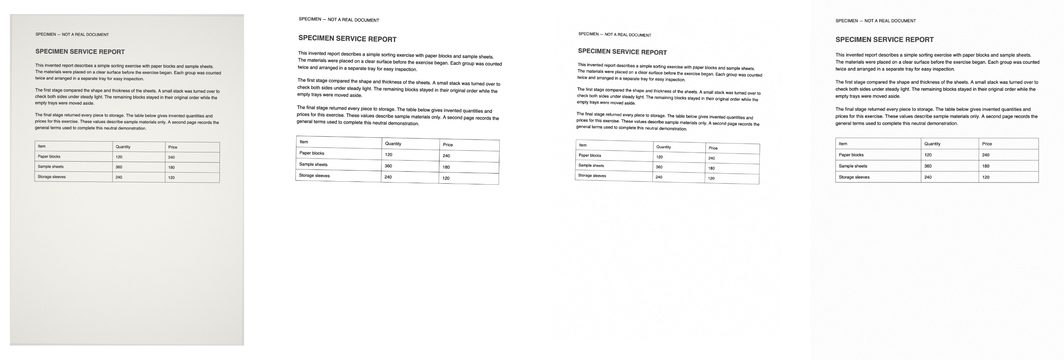
Page one of each file, left to right: LensUp, Look Scanned, ToScanned, Scanner Effect.
What it means
All four kept both pages at A4, left no text to select and stayed readable: the OCR found every one of those words in every file.
They differ in the file they give you. LensUp’s pages are pictures of 205 dpi, the highest resolution here, and its file was 966 kB; Look Scanned’s 150 dpi file was the smallest, at 175 kB, and ToScanned’s the largest, at 1,091 kB. All four came out grey.
Which one to use
All four met our checks for pages, selectable text and readability; how much each looks like a scan is for you to judge from the picture above. If the file has to be small, Look Scanned’s was the smallest here. If resolution matters more, LensUp’s pages had the most; its export also has a target size, which we did not test.
Check it yourself
- All results (CSV): one row per tool — each check, the measured values, and where and when it ran.
- Every saved file (ZIP): what each tool saved and the steps of each run.
- The file we started from: the two-page PDF and its words (JSON).
Limits
- One clean, typed file. Scans of handwriting, photos or very small print are harder to keep readable, and this does not test them.
- How «scanned» a page looks is a matter of taste; the pictures above show it, and we did not score it.
- One run per tool, with its defaults. Before the runs we opened each tool with a test file to learn its steps.
- Not tested: the tools’ other settings, files of many pages, and whether a tool uploads your file.
- We built LensUp and chose the test. The files are above for anyone who wants to rerun it.