The first thing a document scanner does with a photo is find the page: four corners, so it can cut away the table and straighten the sheet. In LensUp this runs in your browser tab, on your device. It happens in two steps. A classical detector straightens the page by itself when it is sure of the corners. When it is not, a small on-device model (DocAligner, Apache-2.0, 2.3 MB) suggests corners that you confirm with one tap; the model never crops anything by itself.
We wanted numbers rather than impressions, so we ran both steps on a public document corner detection benchmark, next to the method most OpenCV tutorials teach, and we publish the per-frame results with this post.
The test
Data. SmartDoc 2015 Challenge 1 (ICDAR 2015, CC BY 4.0): 24,889 video frames of 30 printed documents of six kinds, on five backgrounds, shot hand-held with a tablet at 1920 × 1080. Every frame comes with the page’s true corners. We took 10 frames per document per background, spread across each clip: 1,500 frames.
Framing. In SmartDoc the page is small in the frame, while someone scanning with a phone fills the screen with the page. So we crop each frame around its page, never cutting the page, keeping the real pixels, light and background. The crop is placed using the true corners. That is a choice in our favour, and the numbers below depend on it.
What counts as right. Every corner within 2 % of the image diagonal of the true corner. That threshold is ours; the per-frame corner errors are in the results file if you prefer another.
What we scored on each frame.
- The classical detector: did it straighten the page by itself, and was it right or wrong?
- Where it did not, the model: did it offer corners, and were they right or wrong?
- The textbook OpenCV method on the same crop: blur, Canny edges, the largest contour with four corners.
“Corners ready” counts the frames where you get the right corners: applied right, or offered right and waiting for your tap.
Results
| Background | Frames | OpenCV tutorial recipe, right | LensUp applied, right | LensUp applied, wrong | Model proposal, right | Model proposal, wrong | Corners ready |
|---|---|---|---|---|---|---|---|
| All 1,500 frames | 1500 | 7.2 % | 39.9 % | 2 | 37.8 % | 0 | 77.7 % |
| Light wood desk | 300 | 0.0 % | 60.0 % | 0 | 39.7 % | 0 | 99.7 % |
| Grey round table | 300 | 0.0 % | 53.3 % | 0 | 46.3 % | 0 | 99.7 % |
| Taupe desk | 300 | 36.0 % | 86.0 % | 2 | 13.0 % | 0 | 99.0 % |
| Near-white table | 300 | 0.0 % | 0.0 % | 0 | 90.0 % | 0 | 90.0 % |
| Cluttered desk, page on other papers | 300 | 0.0 % | 0.0 % | 0 | 0.0 % | 0 | 0.0 % |
The page covers a median 35.6 % of each crop.
| OpenCV recipe | Right (all frames) | Found but more than 2 % off |
|---|---|---|
| tutorial | 7.2 % | 3 |
| auto | 2.7 % | 2 |
| dilated | 3.7 % | 6 |
On three of the five backgrounds the page is ready on almost every frame. The classical detector straightens the page by itself on a large share of those frames and was wrong on two frames out of 1,500. The model fills in nearly all the rest, and none of its suggestions was off.
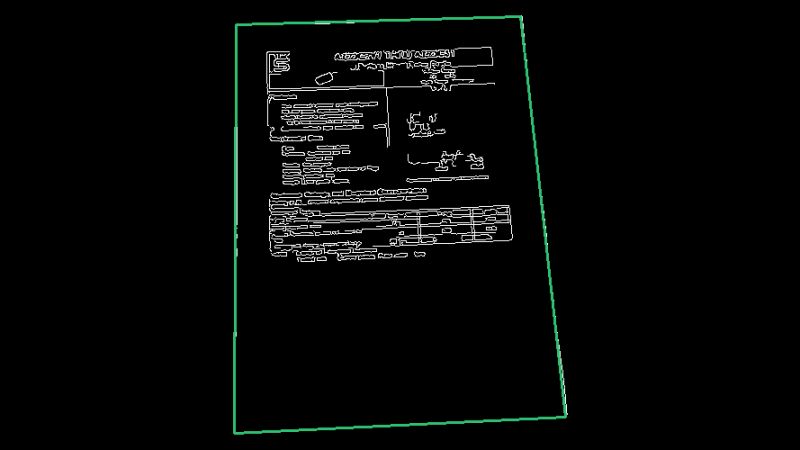
The textbook OpenCV method finds the page only on the taupe desk. That is not a bug in our copy of it. On a light wood desk its edge detector picks up the printed text and nothing of the page’s border, because paper on a pale desk is only a small step in brightness:
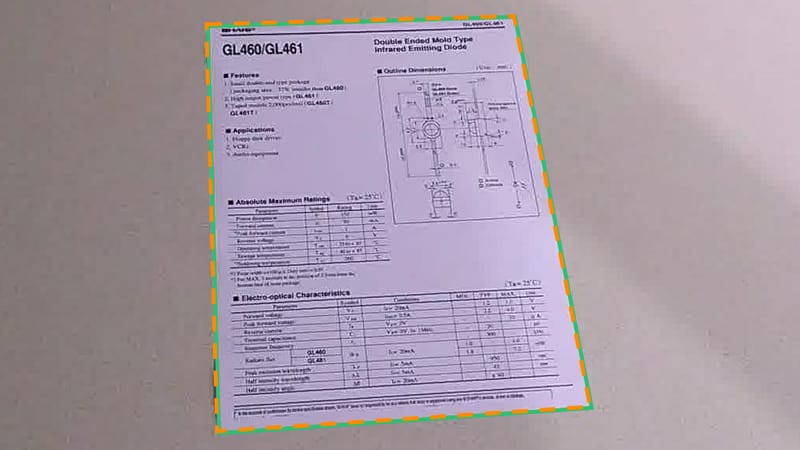
Here the classical detector found nothing on a grey table; the model’s corners (dashed orange) are 0.31 % off and are offered for a tap:
Where it fails
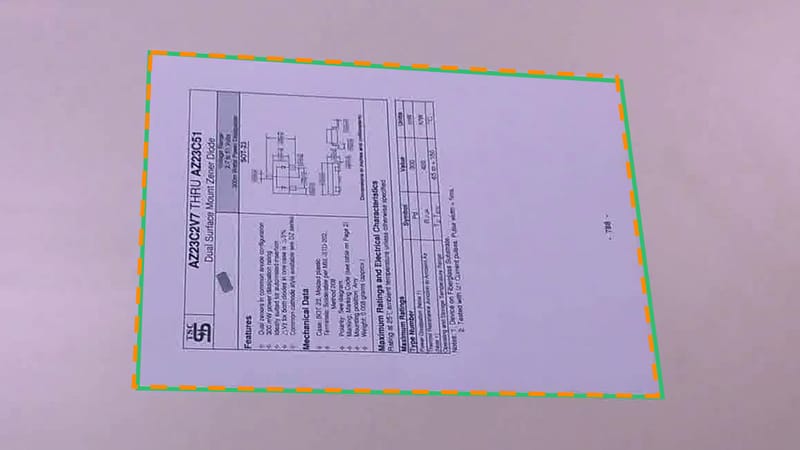
The near-white table. The classical detector never finds the page there: white paper on a near-white table has almost no edge. The model does find it, on 299 of the 300 frames. When we first ran this test, most of those suggestions were held back by one of our own checks: before suggesting corners, the scanner asked that every side of the page show a clear step in brightness. That check was written when the model’s corners were applied without asking, to stop it from cutting a flat scan of a receipt through the middle. Now that the model only suggests corners, we relaxed it on 11 October: when the model is very sure (confidence 0.9 or more) and nothing print-like lies around the page, a faint edge is enough; with no edge at all, nothing is suggested. The table above is measured with the relaxed check. We chose that threshold on these same frames, so read the near-white row as a best case; on our other test sets (the composites below, checked tablecloths, a phone beside the page, and 349 flat scans) it added no wrong suggestion.
In the frame below the model’s corners are 0.67 % off, with a confidence of 0.91 and an edge score of only 0.13. The first run held them back; now they are offered:
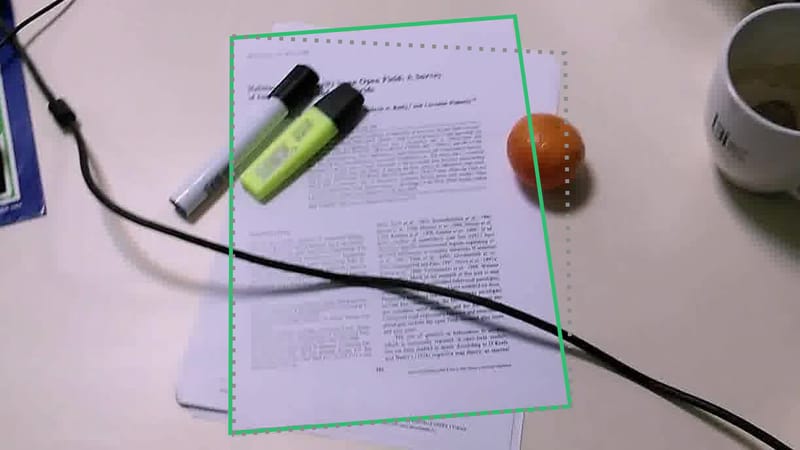
The cluttered desk. Markers and a cable across the page, a mug, an orange, and more paper under the sheet. Neither step copes: the classical detector finds nothing, and the model is often unsure or takes in the paper underneath. In the frame below its corners are 6.8 % off and its confidence is 0.38, so nothing is offered, which is the right outcome:
Since 11 October the scanner goes further: when anything print-like lies around the page (other papers, a phone, a checked tablecloth), or when white paper lies all around it, the model suggests nothing at all. From the outline alone it cannot tell a page on a busy surface from a box printed on a page, and suggesting the box would invite you to cut off everything around it. That costs suggestions on busy surfaces, as the composites below show, and on a card or receipt scanned on a white flatbed scanner.
If your page lies on a busy desk, put it on a plain, darker surface: on the three plain desks above, the page was ready on almost every frame.
A second check: our own composites
SmartDoc is the set the model’s authors tested it on, so for the model it is not a blind test. We also built 84 frames of our own: generated documents laid onto seven generated backgrounds (white table, white marble, a white sheet, a paper stack, light wood, a dark desk, a grey desk), each with a known outline, and ran them through the real scanner page in Chromium, with and without the model file.
| In the scanner page | Frames | Applied, right | Proposed, right | Corners ready | Applied or proposed, wrong |
|---|---|---|---|---|---|
| Without the model | 84 | 28.6 % | 6.0 % | 34.5 % | 0 |
| With the model | 84 | 28.6 % | 54.8 % | 83.3 % | 0 |
These composites look like the composites the model was trained on, so read them as optimistic. The frames on a paper stack get no suggestion by design (print around the page).
How this compares with published SmartDoc results
It does not compare directly, and we are not claiming a rank. The 2015 competition scored the full frames of all five backgrounds, without cropping, as the overlap (IoU) between the found and true page measured in the document’s own coordinates, averaged over all frames. Tropin et al. (2021) leave out the fifth background, where the page lies on a stack of other pages whose borders look the same. In their comparison table (table 1, the first four backgrounds) the methods score between 0.90 and 0.99: 0.9866 for their own on-device method, at 65 ms on an iPhone 6, and 0.9912–0.9934 for a U-Net by das Neves et al. Our test crops each frame to phone framing and counts frames within 2 %, so our table is not on that leaderboard.
Check it yourself
- Per-frame results for the 1,500 SmartDoc frames (CSV): background, document and frame as named in the dataset, the crop window cut from the 1920 × 1080 frame, the share of the crop the page covers, what the classical detector did and its corner error, whether the model offered corners and their error, and the error of each OpenCV recipe.
- Per-frame results for the 84 composites (CSV).
- The OpenCV baseline we ran, as a standalone Python script: with the SmartDoc frames and the results file it cuts the same crops and reruns all three recipes. Our own detector runs in the scanner page itself; the scripts that drive it are not public.
The frames shown here are from SmartDoc 2015 Challenge 1, released under CC BY 4.0 by J.-C. Burie, J. Chazalon, M. Coustaty, S. Eskenazi, M. M. Luqman, M. Mehri, N. Nayef, J.-M. Ogier, S. Prum and M. Rusiñol: “ICDAR2015 Competition on Smartphone Document Capture and OCR (SmartDoc)”, 13th International Conference on Document Analysis and Recognition (ICDAR), 2015. We cropped them, drew the outlines and, in the first figure, replaced the photo with its edge map.
Limits
- The crop uses the true corners, and SmartDoc’s frames are tablet video, not phone photos.
- Five backgrounds, all indoors. A dark tablecloth, a car seat or a hand holding the page are not in the set.
- The 2 % threshold is ours. The per-frame errors are in the CSV if you prefer another.
- The confidence threshold that lets a faint edge through was chosen on these frames.
- Measured on 2026-10-10, and again on 2026-10-11 after relaxing the edge check, with the scanner as it ships on those days. We will rerun this when the detector or the model changes, and update this post.